How to Activate Your Fleet with Smart Connectivity in Under 1 Week
March 2, 2026
It’s 2026: do your vehicles still rely on manual check-ins, spreadsheets, and reactive maintenance? If the answer to any of those is yes, then your fleet is operating below its potential.
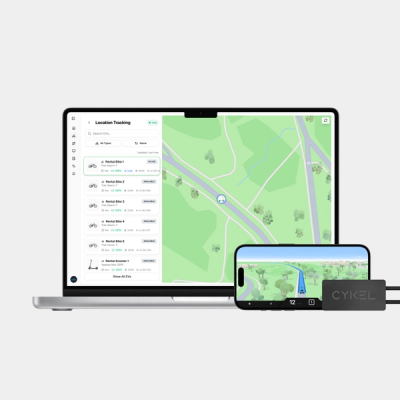
But here’s the good news: fleet smart connectivity changes that equation fast. Within one week, your electric vehicles can be visible, trackable, and manageable from a single dashboard.
The difference comes down to structure.
With the right activation sequence (which we’ll provide you with today), hardware pairing, and operational planning, connected fleet management doesn’t mandate months of deployment.
This guide outlines exactly how to activate your fleet in seven days, all while keeping the process controlled and measurable.
What Fleet Smart Connectivity Means for Modern Fleets
To understand fleet smart connectivity, we must first understand the Internet of Things.
IBM defines the Internet of Things (IoT) technology as “a network of physical devices, vehicles, appliances, and other physical objects that are embedded with sensors, software, and network connectivity, allowing them to collect and share data.”
As it relates to our discussion today, fleet smart connectivity refers to connecting physical vehicles to a centralized digital platform using IoT technology.
This is important because once connected, vehicles can then report live data. This data includes everything from location, battery level, usage metrics, and service alerts.
For fleet managers of electric bike and scooter programs, this data is incredibly valuable.
It provides:
- Real-time tracking
- Geofencing alerts
- Remote diagnostics
- Centralized fleet dashboard visibility
In return, you get operational clarity. That way, you can see what’s happening across the fleet at any given moment.
Can Fleet Smart Connectivity Get You Live in Under One Week?
Although this wasn’t always the case, fleet technology doesn’t require complex retrofits or extended downtime.
With advancements in IoT hardware, the technology now supports plug-and-play installation. This means devices pair quickly with cloud platforms so you can pre-configure connectivity before delivery.
So the answer is now, yes, seven days is realistic for fleet smart connectivity.
That is, if you:
- Define the scope before installation
- Assign clear vehicle IDs
- Configure alerts in advance
- Train staff on two or three core workflows
As tempting as shortcuts can be at this stage, speed ultimately comes from preparation.
The One-Week Activation Plan for Fleet Smart Connectivity
With the aforementioned preparation in mind, let’s move on to your seven-day activation plan.
As you’ll see below, each day is a deliberate phase with a defined outcome.
Day 1: Define Scope and Operational Goals
If you start with the entire fleet, you risk feature overload. Instead, begin with a focused pilot group of vehicles that represent high, low, and edge-of-zone usage.
Then, establish two measurable goals:
- One operational goal (This could be reduced vehicle retrieval time)
- One maintenance goal (This could be a faster response to low battery alerts)
Day 2: Hardware Installation and Device Pairing
Once you’ve chosen your pilot group and set goals for it, each should have IoT hardware installed and paired with the central fleet dashboard.
Does each device successfully connect to the platform? Do they begin transmitting location and battery data? These answers need to be “yes” before you move to the next unit. Otherwise, you risk having small configuration errors spread across the fleet.
As you move through this step, create a clear audit trail, including assigning a unique identifier to every vehicle. Confirm that the physical label matches the digital record and record serial numbers, installation dates, and assigned zones in a shared document.
Alerts, diagnostics, and usage reports should always point to the correct asset, which depends on accurate mapping between hardware and software.
Day 3: Configure Geofencing and Alerts
Now it’s time to define your primary operating zones.
Geofencing uses Global Positioning System (GPS) coordinates to create virtual boundaries. This triggers alerts when a vehicle enters or exits a defined area.
Some of the vital alerts to configure for include:
- Unauthorized movement
- Vehicles leaving service zones
- Low battery thresholds
Keep alerts minimal during initial deployment.
Day 4: Validate Data Accuracy
You protect your timeline with validated data.
“Validated” data includes:
- Location data that aligns with real-life positioning
- Battery levels that refresh at expected intervals
- Correct timestamps
- Alerts that route to the correct staff member
Trigger one test workflow from alert to resolution. Verify the vehicle returns to active status in the system.
Day 5: Build Operational Views in the Fleet Dashboard
Assemble two primary dashboard views—these will reduce decision time.
You’ll want an operations view (for location and availability) and a maintenance view (for service needs).
Then, integrate remote diagnostics signals into actionable workflows.
For example, if battery levels fall below the threshold, automatically assign an inspection or charging.
Day 6: Staff Training and Live Simulation
Train team members on three primary tasks:
- Locating a vehicle
- Resolving an alert
- Recording a service note
Next, put your training to the test by running a supervised live shift simulation.
Hands-on practice like this ensures the system becomes part of daily operations rather than an unused tool.
Day 7: Go Live
On the seventh and final day of the initial activation, deploy connectivity across the remaining fleet.
Roll out installations in controlled batches rather than all at once. This way, your team can spot patterns and resolve issues quickly.
Monitor alerts and usage patterns closely for 48 hours.
During this stage, watch for:
- Repeated notifications
- Unexpected location pings
- Battery readings that fall outside expected ranges
These signals often point to configuration gaps rather than hardware failure.
During this stage, adjust thresholds as needed. You might need to refine geofence boundaries, battery alert levels, and notification routing. Fortunately, you can now do this based on real activity rather than assumptions.
Connectivity Architecture for Fleet Smart Connectivity
Connectivity models influence cost, reliability, and operational control.
Right now, the two most common approaches are smartphone-assisted connectivity and embedded cellular connectivity.
Here’s an overview of each model:
Smartphone-Assisted Connectivity
- Vehicles connect through a rider or operator's smartphone
- This reduces embedded hardware requirements
- It works well for hospitality fleets and guest-access programs
Embedded Cellular Connectivity
- Vehicles contain built-in connectivity hardware
- Many fleets use eSIM technology for embedded communication
- An eSIM is a programmable digital SIM card that allows remote activation without physical replacement
- Remote SIM provisioning allows fleet managers to update connectivity profiles over the air
- This model reduces reliance on user devices and increases control
Security and Compliance in IoT Fleet Management
Connected fleets introduce a host of cybersecurity considerations.
- Device identification
- Device configuration
- Data protection
- Logical access control
- Software updates
- Security state awareness
These principles apply directly to fleet programs, and with them in mind, some of the most important questions to ask vendors in terms of security and compliance include:
- Who can access configuration settings?
- How are updates delivered?
- How is data encrypted?
- What audit logs are available?
Doing this (security planning during activation) now prevents risk down the line.
Measuring Success After Fleet Activation
Connectivity alone doesn’t deliver value. So, what does? Operational outcomes.
You can track a number of early performance indicators to get an idea of where things stand:
- Alert response time
- Fleet utilization rate
- Service turnaround time
- Unauthorized movement reduction
FAQs: Fleet Smart Connectivity
How long does fleet activation actually take?
With pre-configured hardware and defined workflows, activation can occur within seven days.
The timeline depends more on organizational readiness than installation time.
Do all vehicles need cellular connectivity?
Not always. Some fleets rely on smartphone-assisted connections. Others use embedded eSIM connectivity for greater independence and control.
The right model depends on the use case and operational environment.
What data should I monitor first?
Start with location, battery status, and maintenance alerts. These three signals support daily decision-making without overwhelming staff.
Once stabilized, you can gradually expand metrics to get an even more comprehensive view.
How is geofencing used in practice?
Geofencing establishes digital boundaries using GPS.
When a vehicle exits an approved area, the system triggers an alert or automated action.
Common uses include theft prevention and zone compliance.
What happens if connectivity fails?
Connectivity resilience protects uptime, so you’ll want to define fallback procedures before launch.
Some of the procedures and protocols to document include offline logging, manual override options, and automatic reconnection attempts.
Ready to Activate with CYKEL?
When you define scope, pair hardware correctly, configure alerts with intention, and train your team on core workflows, fleet smart connectivity becomes operational within one week.
With the structured phases we’ve just covered, you gain the ability to anticipate problems rather than reacting to them.
Now, you can manage your fleet from a live system designed for real-world performance.
Eager to deploy fleet smart connectivity without unnecessary complexity? CYKEL provides everything you need (the hardware, platform, and activation framework) to support a one-week rollout.
From IoT-enabled hardware and centralized fleet dashboards to secure connectivity architecture and remote diagnostics, CYKEL helps you move from planning to live deployment with clarity and control.
Start your seven-day activation plan with CYKEL and turn your vehicles into connected, manageable assets built for 2026 and beyond.

Written by
CYKEL Team
March 2, 2026
Last updated: March 2, 2026